How To Download Simple Tv On Firestick UPDATED
How To Download Simple Tv On Firestick
Last Updated on February 27, 2022 by
In this article, I volition be educational activity you how to install IPTV Smarters Pro on Firestick then, if you are interested and so please keep reading this article till the stop.
IPTV services are currently in the boom, we have seen lots of new IPTV services that are coming and providing the best features at very affordable prices, a few years back there was no awareness about IPTV services only now people are agreement and they are cutting the string and adopting the IPTV services considering information technology is cheaper and features loaded service.
I take been also using IPTV service, in by, I have tried several IPTV services like Sportz TV IPTV, Sapphire Secure IPTV, Eternal Tv, Area 51, etc yet, to use IPTV services on firestick you must have to install a good IPTV media histrion like IPTV Smarters Pro. I am currently using IPTV Smarters Pro on firestick and believe me it is one of my favorite media players.
I have tried lots of media thespian like Duplex IPTV, So Thespian, etc but mind you the features of the IPTV smarter pro is actually skillful and the all-time thing is it is available for free to use. There are some IPTV media players that need a subscription but that'south non the case with this 1, you can use IPTV Smarters on firestick without paying any penny from your pocket.
I accept seen lots of firestick users struggle in installing IPTV Smarters Pro on firestick, don't worry today I am here to assist y'all out. I will be teaching all the firestick users how to install IPTV Smarters Pro on Firestick very easily.
At present earlier I brainstorm to tell you how to install IPTV Smarter on firestick, allow'southward first discuss what is IPTV Smarters Pro in item.
What is IPTV Smarters Pro?
IPTV Smarters Pro is basically an IPTV media player or yous can say it is a video media player. Purchasing the IPTV services isn't only enough, after you lot fabricated your purchase you need to find yourself a practiced quality media player considering a media player will decide all the features and other expert things.
IPTV Smarters Pro is a pretty popular media player that you can install on your Android running smartphone, Android Television set, or even on firestick. One thing that I want to make clear is that IPTV Smarters Pro doesn't provide whatever service itself, you have to use the IPTV service that you purchased with the IPTV Smarters pro to scout live Television set channels, movies, TV serial, etc.
The best affair most IPTV Smarters is that, unlike some other IPTV media players, this ane is completely free to use. Also, information technology is quite easy to utilize, all you need to do is enter your IPTV service URL along with your username and countersign and you are done.
Now let'southward see how to install IPTV Smarters Pro on firestick. The very first matter that we need to do is brand some changes in the settings of the firestick.
Configure Firestick to Install IPTV Smarters Pro
If you don't know then let me tell you, IPTV Smarters Pro on firestick can not exist installed directly from the Amazon app store, since this app is not available on the Amazon app store yous need to sideload it manually, and before we do that yous need to enable Apps from unknown sources on firestick.
If you don't know how to enable information technology then don't worry I take written all steps beneath.
How to Install IPTV Smarters Pro on Firestick via Downloader
Equally I already said above IPTV Smarters Pro is not available on the Amazon app shop, so the merely way of installing this app on your firestick is by sideloading it. And whenever it comes to sideloading apps on firestick, the only app that we apply is "Downloader".
And then, the very first thing that we need to do is install the Downloader app on firestick, you can hands install it from the App Store, if you don't know how to install apps from the Amazon app store then don't worry, I have written all the required steps below. Please read them carefully.
Now we are all set to install IPTV Smarters on firestick. Follow the below steps to know how to use the Downloader app to sideload IPTV Smarters Pro.
Step 1) Get-go of all, open up the 'Downloader' application that y'all installed earlier.
Step 2) Click on'Allow' whenever it asks to grant all the required permissions. You tin besides change the permission subsequently by going to Settings >> Applications >> Manage Installed Applications >> Downloader > Permissions.
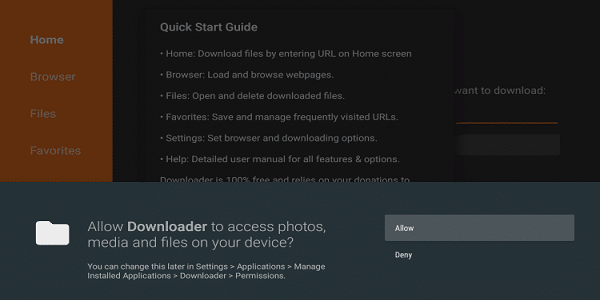
Step 3) Now you lot will see a domicile screen of the downloader app.

Stride 4)Now here you need to enter the URL of IPTV Smarters Pro APK, yous don't need to discover the URL yourself, I have already done that function for you lot, just type this URL firestickwiki.com/smarters and make sure that you are typing the URL correctly.

Step 5)Once the URL is written, you need to click on the "Go" push button and then the Downloader app volition start doing its job. If the URL is correctly entered then your download will offset in no time.

Stride half dozen) Once the APK of IPTV Smarters Pro is downloaded, click on the "Install" button.
Step seven)Wait for a few seconds and you will see that the app is at present installed.

Step 8) Click on the "Washed" push button once the app is installed successfully.

Step ix)Since we are done with installing IPTV Smarters Pro on firestick, the APK that we downloaded in step half dozen is now of no employ and it is sensible to delete information technology now, so simply get back to the Downloader screen and click on the "Delete" button.

Stride 10) If information technology is asking for confirmation so again simply click on the'Delete' button.

Now the IPTV Smarters Pro is completely installed on your firestick. You lot are at present all fix to utilize it at present on your firestick. If you don't know how to utilise it and so don't worry below I have explained everything in particular. So, if you are new to IPTV Smarters Pro then I highly recommend you to read the beneath section to go the basic knowledge nearly IPTV Smarters Pro.
Ever use ExpressVPN on firestick to avoid legal issues
We know using IPTV is banned in the U.s.a. and other parts of the world, but don't worry you lot tin can nonetheless use IPTV, and already millions of people are using IPTV without any trouble. All you need to do is use ExpressVPN to hide your IP address. It is very important to hibernate your identity using a VPN while streaming through IPTV, so I highly advise you lot to use ExpressVPN.
ExpressVPN tin help you to avoid legal problems as it can be used to hide your IP address.
Click Here to Signup to ExpressVPN and hide your identity.
Follow the beneath steps to know how you can install ExpressVPN on your FireStick.
How to Use IPTV Smarters Pro
Now afterward you have installed IPTV Smarters Pro on firestick, I suggest y'all move the application to your firestick's dwelling screen. To do and so all yous need to exercise is become to your Apps & Games section and scroll down until you run across IPTV Smarters Pro, highlight it and press the "Option" button on the fire telly remote and and then click on the Motion option, now you tin can elevate the app wherever y'all desire.
After that launch the IPTV Smarters Pro and when you launch the application for the first time, information technology will show you some terms and conditions which you don't need to read. So simply scroll down and so click on "Have".

After that you volition see the screen like this:

Now if you desire to load your playlist and then you need to copy the URL of the file or playlist and then y'all demand to enter it hither. To practice so, re-create the URL so click on the offset option that "Load Your Playlist of File/URL".

Subsequently yous practice that information technology will ask you to enter the Playlist Name, and so hither you can type whatsoever name of your option. Then you need to select Playlist type whether information technology is file or M3U URL. Then at final you lot demand to click on "Add User".

Now if you click on Login with Xtram codes API then here you need to enter the name and then the username and password of your IPTV service and so you demand to click on "Add User".
How to Record Screen with IPTV Smarters
Many of you lot guys were asking me whether you can tape your screen with IPTV Smarters and the answer to this question is Hell Yeah! y'all can easily record your screen with IPTV Smarters. It has the in-built feature of a recording screen, so if you desire to record your favorite TV show, movies, or any episode of live Goggle box and so you lot can do that very hands.
Y'all can't do that with the stock player of IPTV Smarters simply you can do it with MX Player very easily.
Follow the below steps to know how to practise it.
- Offset of all, go to Settings.
- You will see different options now, all you demand to do is click on Player selection.
- Now on the adjacent screen, you volition run across the choice of "Add together player" at the top right corner.
- If you have VLC or MX Player installed then select any of your favorite ones and then click on Add.
- Afterwards the MX Player is selected.
- Become back to the main screen and stream anything that you wish to record. You tin can now record it with the help of an MX Player or VLC media player.
Highlights of IPTV Smarters Pro
- 1 of the best IPTV media players with tons of features.
- Dissimilar other IPTV media players, IPTV Smarters is completely free to utilize, however, it does accept a paid version simply you don't demand to buy it until and unless you lot require high-end features. All the bones features are available in the free version.
- It has the characteristic of recording your screen which is indeed a very helpful and useful feature.
- Yous tin can enjoy your favorite Tv show, movie, or any live TV aqueduct with subtitles.
- Bask a high-quality streaming experience.
Oftentimes Asked Questions – IPTV Smarters
Question) Is IPTV Smarters complimentary to utilize?
Yes, Absolutely. IPTV Smarters is completely free to download and use. You don't take to pay a unmarried penny from your pocket to employ IPTV Smarters on firestick. Withal, IPTV Smarters does take a paid version only you don't demand to worry about that since all the basic features are available in the free version.
Question) What is IPTV Smarters?
Well, IPTV Smarters is an IPTV media player, it is not an IPTV service, people get confused thinking that IPTV Smarters provides an IPTV service which is not true at all. IPTV Smarters Pro doesn't host any content itself, instead, it permit you stream the content of other IPTV services. And so, if you lot take already purchased an IPTV subscription then you lot demand to use IPTV Smarters to load your playlist.
Question) Is IPTV Smarters legal to use?
Yes IPTV Smarters is legal and prophylactic to use unless y'all are not streaming any copy-righted content. Every bit long equally yous are not violating whatsoever copyright laws yous are good to become. But if you wish to stream copyrighted content then I must suggest you lot accept the help of ExpressVPN and hide your identity so that you tin can stream anonymously.
Also Read:
How to Watch Free Movies on Firestick
How to Install Apollo Grouping TV on Firestick
How to Cease Buffering on Firestick
Decision
Well, that'south it guys for this article. Here in this article, I explained everything related to IPTV Smarters on firestick, I shared the steps of how to get IPTV Smarters Pro on firestick and how to use it. In last I would like to say IPTV Smarters is indeed a very good media histrion and I myself using this media thespian for a very long time and till now I am using it and I have no complaints. I highly suggest you get with this IPTV player without thinking twice.
If you have any doubts or if you are stuck at any step then exercise let me know, I will effort to solve your query every bit soon as possible.
DOWNLOAD HERE
Posted by: cantuanduke1967.blogspot.com

