Office 2016 For Windows 10 Free Download UPDATED
Office 2016 For Windows 10 Free Download
Office 2019 Office 2016 Part 2016 for Mac Office 2013 More...Less
If this is the first fourth dimension you lot're installing Function you lot may accept some setup steps to do outset. Aggrandize the learn more section below.
However, if yous're reinstalling Office, and you've already redeemed a product key and accept an account associated with Office, and then become to the section sign in to download Part.
Install Office for the first time
Some Office 2019, Office 2016, and Function 2013 products come up with a production fundamental. If yours did, earlier installing Office for the get-go time, sign in with an existing or new Microsoft account and enter your product key at role.com/setup. Redeeming your central is what links your account with Part so you only accept to practise this in one case. Already did this? Select the tab below for the version you're trying to install.
Reinstall Function
If Part originally came pre-installed and you need to reinstall on it on the same device or a new device, you should already have a Microsoft business relationship associated with your re-create of Office. This is the business relationship you'll use to install Office following the steps beneath. If you need to uninstall Office get-go, come across Uninstall Office from a PC or Uninstall Office for Mac.
Note:The steps to install the 2019, 2016, or 2013 versions of Part Professional Plus, Role Standard, or a stand-lonely app such equally Word or Projection might be different if you got Office through one of the following:
Microsoft HUP: If you bought Role for personal utilise through your company, encounter Install Office through HUP.
Volume license versions: If you work in an organization that manages your installations, you might demand to talk to your IT department. Some organizations take different methods to install Part on multiple devices.
Third-political party seller: You bought Office from a tertiary-party and y'all're having problems with the product central.
Sign in to download Office
-
Get to your Microsoft account dashboard and if you're not already signed in, select Sign in.
-
Sign in with the Microsoft account you lot associated with this version of Office.
Forgot your account details? See I forgot the account I employ with Part.
-
From the top of the page, select Services and subscriptionsand on that folio observe the Office product you want to install and select Install.
To install Office in a unlike language, or to install the 64-scrap version, select the link Other options. Choose the language and fleck version you want, and then select Install.
You're now ready to install Office. Select the tab beneath for the version you're trying to install.
Install Office 2019 or 2016 on a PC
Remember a one-time buy version of Role is licensed for i install but.
-
Depending on your browser, select Run (in Edge or Cyberspace Explorer), Setup (in Chrome), or Save File (in Firefox).
If yous see the User Account Control prompt that says, Practice you want to allow this app to make changes to your device? select Yes.
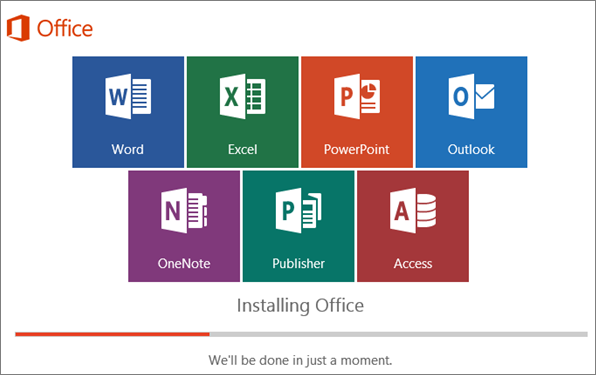
The install begins.
-
Your install is finished when you encounter the phrase, "You're all set! Function is installed at present" and an animation plays to prove yous where to find Role applications on your computer. Select Close.
Follow the instructions in the window to notice your Office apps. For case depending on your version of Windows, select Get-go then scroll to find the app you desire to open such every bit Excel or Discussion, or blazon the name of the app in the search box.

Installation or sign in issues?
If you're unable to install Office see Troubleshoot installing Office for more help.
Activate Function
-
Commencement using an Office application right away past opening any app such as Discussion or Excel. Can't find Office afterward installing?
In most cases, Office is activated once you start an application and after y'all hold to the License terms by selecting Accept.
-
Office might actuate automatically. Notwithstanding, depending on your product you might meet the Microsoft Part Activation Wizard. If so, follow the prompts to actuate Office.
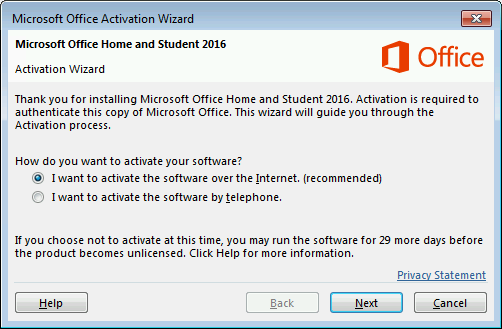
If y'all demand activation assist, come across Activate Function.
Install Part 2016 on a Mac
-
Once the download has completed, open Finder, go to Downloads, and double-click Microsoft_Office_2016_Installer.pkg (the name might vary slightly).
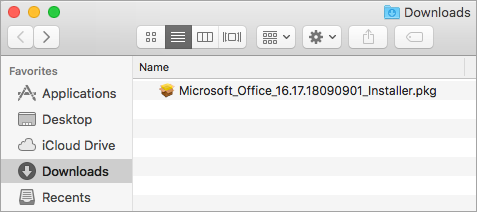
Tip:If you run into an error that says the Microsoft_Office_2016_Installer.pkg tin can't be opened because information technology is from an unidentified programmer, wait 10 seconds and so try double-clicking the installer package again. If you're stuck at the Verifying…. progress bar, close or cancel the progress bar and endeavour again.
-
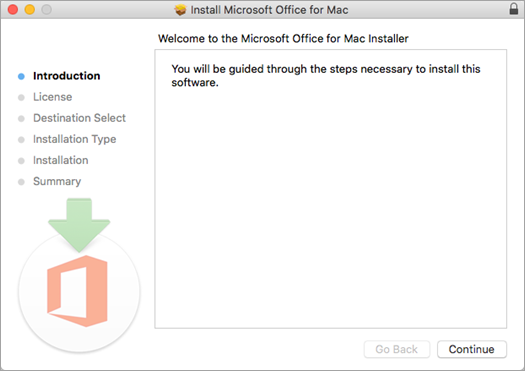
On the first installation screen, select Proceed to brainstorm the installation procedure.
-
Review the software license agreement, and then click Continue.
-
Select Concord to concur to the terms of the software license understanding.
-
Cull how you want to install Function and click Continue.
-
Review the disk space requirements or change your install location, and then click Install.
Note:If y'all want to only install specific Office apps and non the unabridged suite, click the Customize button and uncheck the programs you don't want.
-
Enter your Mac login countersign, if prompted, and and so click Install Software. (This is the password that you use to log in to your Mac.)

-
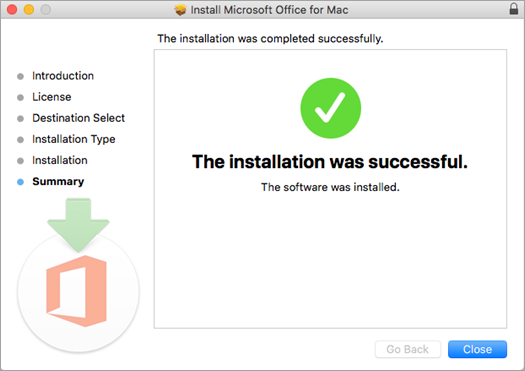
The software begins to install. Click Close when the installation is finished. If Office installation fails, see What to try if you can't install or activate Office 2016 for Mac.
Launch an Function for Mac app and commencement the activation process
-
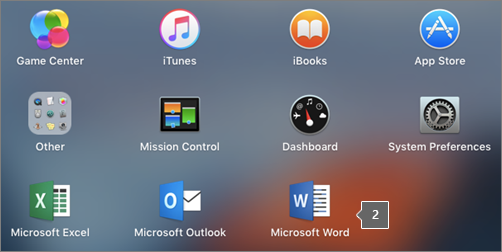
Click the Launchpad icon in the Dock to display all of your apps.

-
Click the Microsoft Word icon in the Launchpad.
-
The What's New window opens automatically when you launch Discussion. Click Become Started to start activating. If you need assist activating Office, see Activate Office for Mac. If Part activation fails, encounter What to endeavour if you can't install or activate Office for Mac.

Installation notes
Installation notes
Can I install Office 2016 for Mac and Function for Mac 2011 on the same estimator?
Yeah, you tin can install and use Office 2016 for Mac and Office for Mac 2011 at the same time. However, we recommend that you uninstall Part for Mac 2011 before you install the new version just to prevent any confusion.
To uninstall Office for Mac 2011, follow the steps in Uninstall Office 2011 for Mac.
How do I pin the Part app icons to the dock?
-
Become to Finder > Applications and open up the Office app you desire.
-
In the Dock, Command+click or right-click the app icon and choose Options > Go on in Dock.
Can I install Office on my iPhone or iPad?
Yep, see Install and set Role on an iPhone or iPad. Yous can also set email on an iOS device (iPhone or iPad).
Install Office 2013 on a PC
-
To brainstorm the installation, depending on your browser, click Run (in Border or Internet Explorer), Setup (in Chrome), or Save File (in Firefox).
-
When you lot see "You're adept to go", choose All washed.

-
Showtime using an Office application right away by opening whatever app such as Give-and-take or Excel. In most cases, Part is activated once y'all first an awarding and after y'all click Take to agree to the Microsoft Office License Understanding.
Tip:If you completed the installation and you can't find the Function applications on your reckoner, come across How to detect the Office applications.
-
Role might actuate automatically when you open an app, such every bit Word, for the commencement fourth dimension. If it doesn't and you see the Microsoft Office Activation Sorcerer, follow the prompts to actuate Role. If you need help with activation, come across Activate Role using the Activation wizard.
DOWNLOAD HERE
Posted by: cantuanduke1967.blogspot.com

